



















Google shows shipping and return information inside Search and Shopping results, on free listings and Shopping ads. Google’s current Shipping attribute guidance explains how merchants submit a product’s shipping cost and speed when account-level settings do not apply or need to be overridden.
What the annotations are for
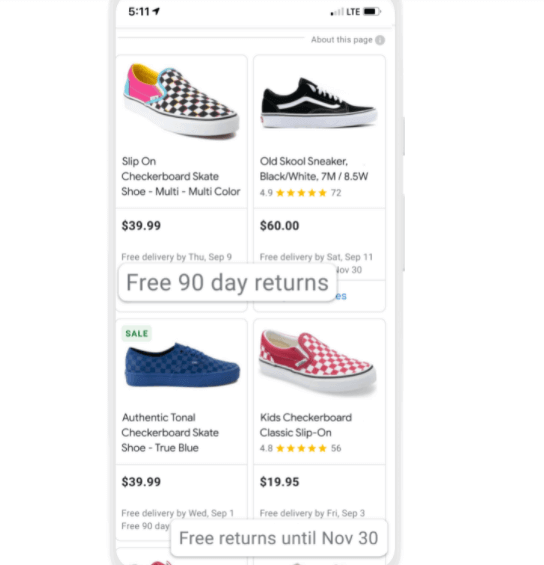
The change is aimed at the holiday season, and at the two things a shopper wants to know before clicking: whether delivery is free, and whether returns are. For merchants it is a way to stand out, and to have a commitment to customer service visible at the moment of the decision rather than three pages into the site.
Which products get the labels
Only merchants who meet Google’s list of requirements get them, so the labels will probably not appear across all products. What retailers gain is the ability to say in the search result itself that they have a special offer on shipping or returns — information not every retailer publishes on its own site.
What shoppers see
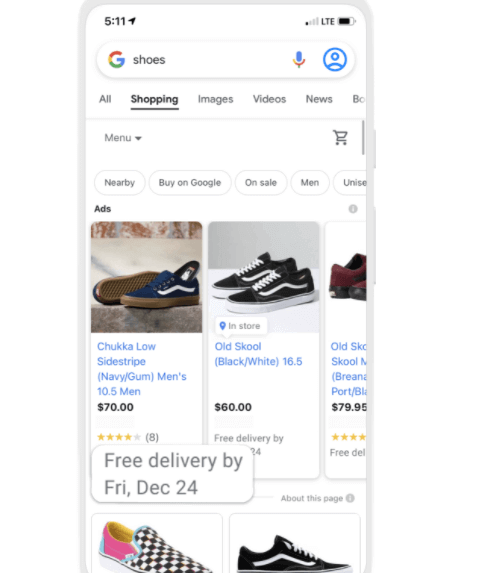
The annotation gives a date rather than an adjective. Shoppers see their order’s shipping detail in the result — “Free delivery by Monday, January 1st” or “Get it by Jan 1st” — where before the change an annotation said only that delivery was fast or free.
Waiting is the frustrating part of ordering online. Knowing when the order will arrive before placing it is what makes a shopper comfortable placing it.

- The merchant records delivery cost and speed in the product feed's Shipping attribute
- Carrier synchronisation supplies delivery information for the route
- The system calculates a delivery estimate for the shopper
- Search and Shopping results surface the qualifying shipping or return annotation
- The shopper can consider that information before opening the store
How to set your shipping information up
Start in Google Merchant Center, and check what is already there before adding anything. Synchronise your shipping data with providers such as FedEx, USPS and UPS so Google can calculate custom shipping speeds for your customers, and use the Shipping attribute in your feed to specify each product’s cost of delivery and speed.
If you would like this set up rather than explained, talk to us — and our blog carries the rest of what we are watching in search and shopping.
Frequently asked questions
Where do Google shipping and return annotations appear?
Google can show shipping and return information in Search and Shopping results, across free listings and Shopping ads, when the merchant meets the applicable requirements and its product page, checkout and Merchant Center settings agree.
Do the annotations appear on every product?
No. The labels appear on free and paid listings only where the merchant meets the list of requirements Google has set, so they will probably not appear on all products.
What do the shipping annotations look like?
They show the delivery detail in the search result itself, in forms such as “Free delivery by Monday, January 1st” or “Get it by Jan 1st”. Before this change, annotations said only that delivery was fast or free.
How does a merchant set up shipping information for this?
Check and set up your shipping information in Google Merchant Center, synchronise your shipping data with providers such as FedEx, USPS and UPS so Google can calculate custom shipping speeds, and use the Shipping attribute in your feed to specify each product’s delivery cost and speed.
Why do these annotations matter to shoppers?
Not every retailer lists shipping and return terms on its own site, so surfacing them in the result lets a shopper find what they are looking for without opening each store — and knowing when an order will arrive is what makes them comfortable placing it.