




















Even when your content has what people are looking for, make it easily discoverable by optimizing it for search. Global Wizards highlights the benefits of using the TubeBuddy extension to enhance your videos.
What YouTube SEO actually does
YouTube’s search engine optimization system helps you get discovered by potential viewers when they are searching for videos on YouTube or Google. This technique alone will not guarantee success, but it provides an extra chance to reach more viewers as part of a comprehensive media strategy.
YouTube video SEO is the set of practices by which videos, playlists, metadata, descriptions, and channels are optimized to increase their rankings on YouTube. Ranking on the first page for a search, boosting an advertisement campaign’s visibility, or gaining more subscribers is possible with this practice — and our note on YouTube SEO services covers what that work looks like when an agency does it.
What is TubeBuddy?
There are many browser extensions and plugins that add tools to websites like YouTube. The TubeBuddy extension adds its features right on top of every video page you visit, which is the reason it gets used: the work happens where the video already is.
As described here in August 2021, the plugin was available in Google Chrome, Firefox, and Safari, and it offered free versions and paid versions.

- Productivity tools cover comments, scheduling and thumbnail creation
- Bulk processing copies or removes repeated end-screen and thumbnail elements across videos
- Video SEO tools cover keyword discovery, rank tracking and best-practice audits
- Promotion tools package share materials, milestones and audience timing
- Data and research tools cover alerts, audience language, search insight and video analytics
The five categories of TubeBuddy tools
TubeBuddy divides its tools into five categories. These are the ones worth knowing before you install it.
Productivity tools
Within this section there are 16 tools. The most useful are Comment Formatting, Emoji Picker, Scheduled Publish and Thumbnail Generator.
Comment Formatting removes or applies the format of comments and replies, so you choose the type of lettering your comments carry.
Emoji Picker makes titles stand out without visiting an external site to find the emoji.
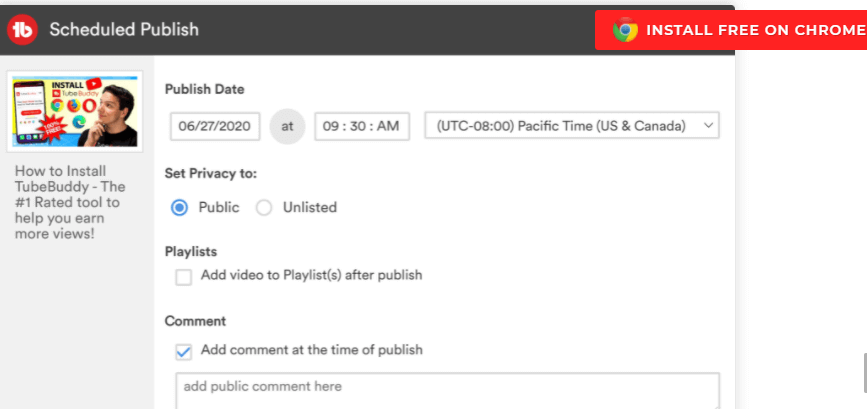
Scheduled Publish adds a video to a playlist automatically on a particular date. You can also use it to give loyal patrons an exclusive preview before the general public gets a chance.
Thumbnail Generator designs thumbnails from a single static frame taken from your video.
Bulk processing tools
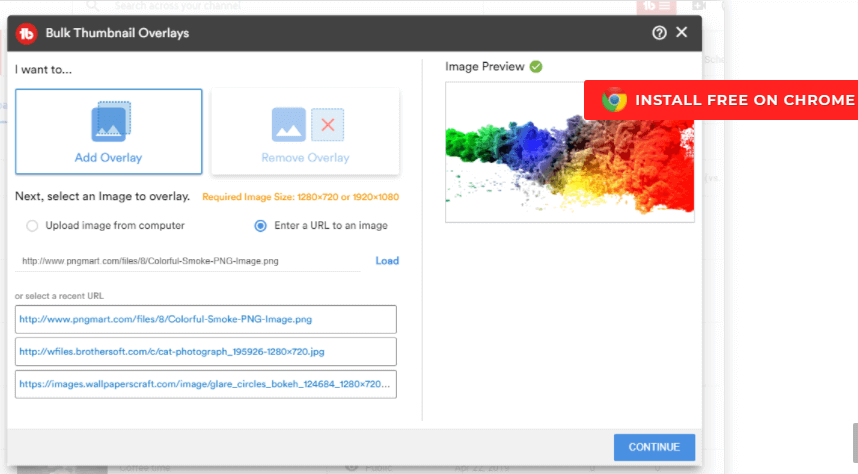
Bulk Processing holds the automation options: Bulk Copy End Screen, Bulk Delete End Screen and Bulk Thumbnails Overlay.
Bulk Copy End Screen automates adding End Screen elements, instead of adding them by hand to every video.
Bulk Delete End Screen removes an End Screen element pointing at a site, video or playlist that is no longer being promoted.
Bulk Thumbnails Overlay adds a graphic overlay such as a logo to your video thumbnails, and can later remove it from some or all of them.
Video SEO tools
This is where the tools that do the actual optimisation live: Keyword Explorer, Search Rank Tracking, Best Practice Audit, and others.
Keyword Explorer helps you discover trending tags, which is how you keep a video relevant long after it was published.
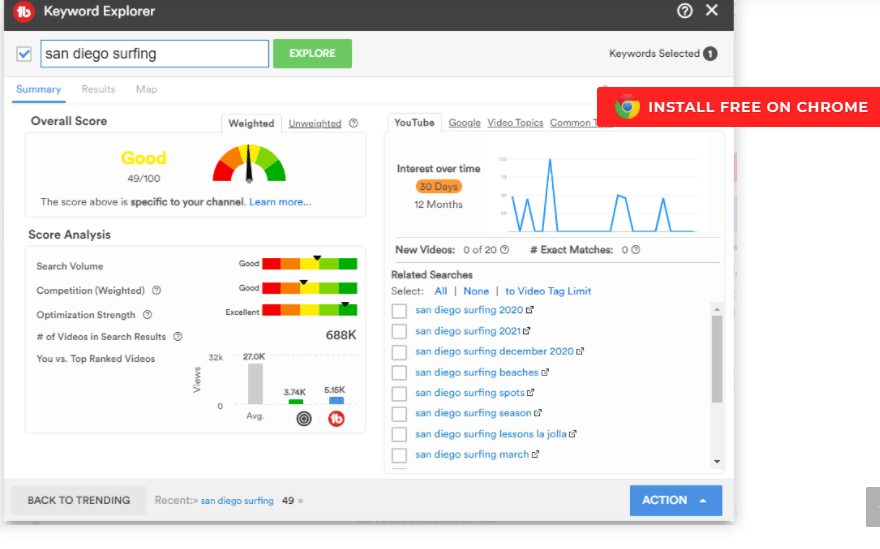
Search Rank Tracking tracks your SEO efforts and compares your keywords against competitors, with the overall status of the channel’s performance alongside.
Best Practice Audit checks automatically that you are sticking to YouTube’s recommendations — for example, that none of your video descriptions carry broken links.
Promotion tools
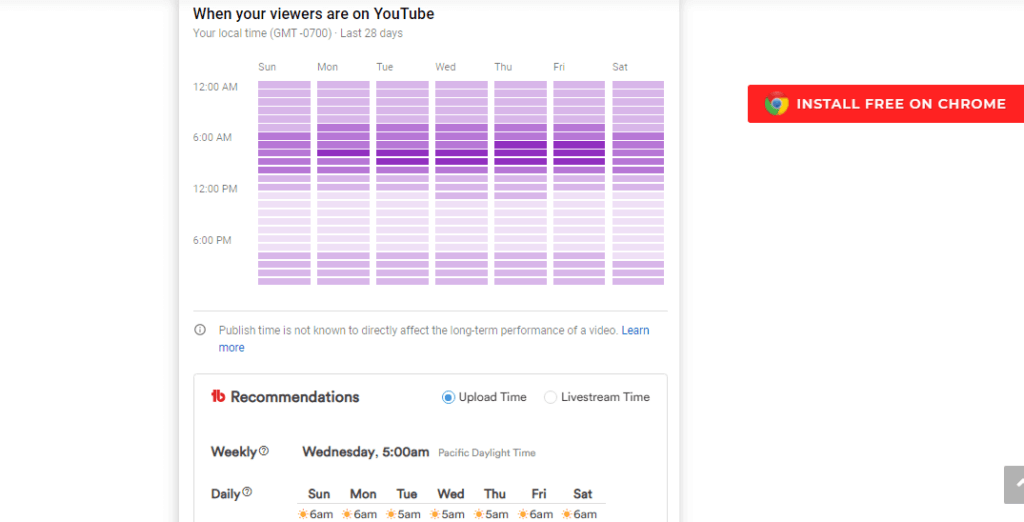
Promotion holds Promotion Materials, Milestones and Best Time to Publish.
Promotion Materials are specialized links and codes for promoting your videos or your channel.
Milestones marks a channel’s achievements so you can share them on social media, or print and frame them.
Best Time to Publish identifies when your audience is most active, so you know when to publish.
Data and research tools
This group holds Brand Alerts, Language Analysis, Search Insights and Videolytics.
Brand Alerts monitors content related to you or your product — videos, playlists and channels — and notifies you when somebody uploads a review of your product. It also tracks competitors’ uploads.
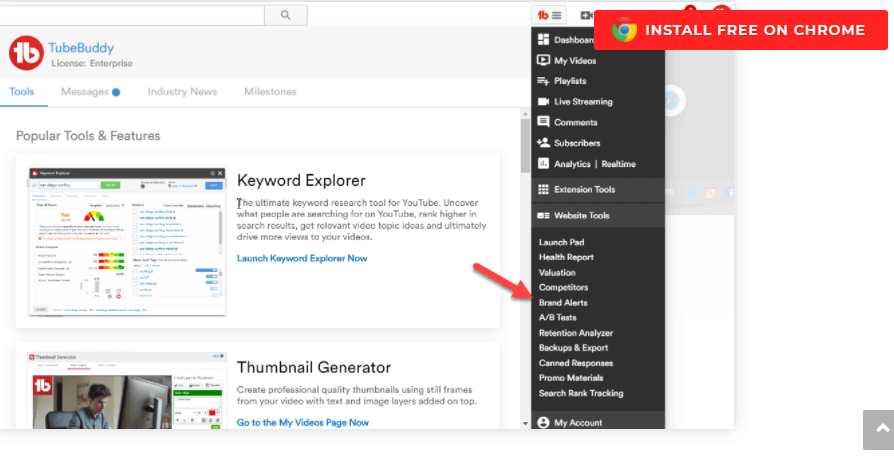
Language Analysis shows which languages a particular channel’s audience speaks, so you can decide which languages to translate key tags into, and target better.
Videolytics gives you advanced analytics for any YouTube video.
What TubeBuddy cost in 2021
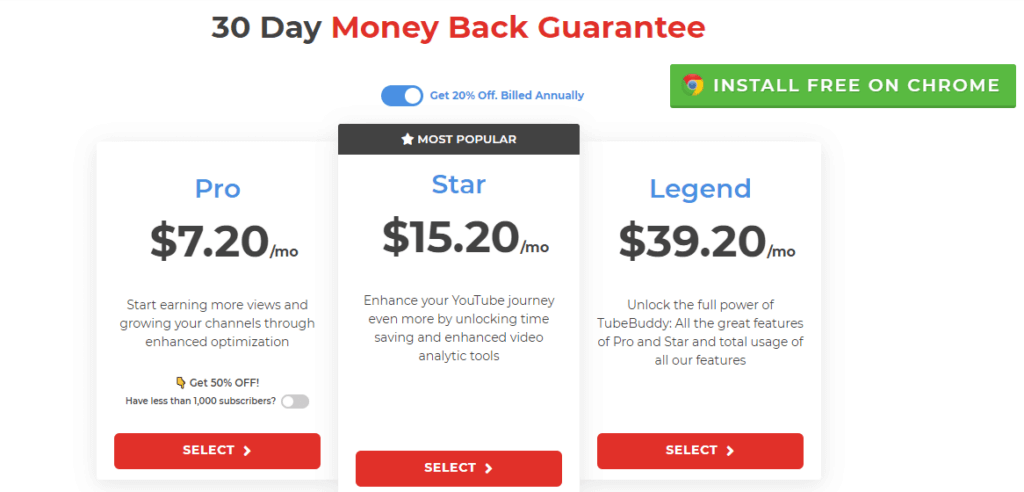
As of the pricing page this article described in August 2021, TubeBuddy offered three paid plans: Pro, Star and Legend. Each carried a 30-day money-back guarantee and could be cancelled at any time.
Star was the plan marked most popular, and it added time-saving tools and boosted video analytics.
There was also a free plan, which covered most of what you need to get started. The main difference from the paid plans was that bulk processing tools were not available; the rest of the tools for optimising a channel and its videos were.
The vendor also offered special discounts for non-profits at that date.
Why Global Wizards recommends TubeBuddy
Global Wizards, a YouTube SEO specialist agency, believes in the power of TubeBuddy and recommends it. Our team has seen good results using TubeBuddy for influencers, and our clients have noticed increases in their video views.
Our own YouTube SEO specialists use the extension to optimize some of our clients’ channels and videos. Inmigrando con Kathia, Erika Jurado and Yohana Saucedo — to name a few — have proven the efficiency of the TubeBuddy extension.
TubeBuddy has a wide set of options without breaking the bank, which is why we rate it as the most complete video SEO toolkit we have used. That is our own assessment and not an independent benchmark.
If you are interested in reading more about this and other related topics, visit our blog or leave us a message.
Frequently asked questions
What is YouTube SEO?
YouTube SEO is the practice of optimising videos, playlists, metadata, descriptions and channels so they rank higher on YouTube, and so a viewer searching on YouTube or Google can find them. It is not a guarantee of success; it is an extra chance to reach viewers as part of a wider media strategy, and it is what makes ranking on a first page or gaining subscribers possible.
What is the TubeBuddy browser extension?
TubeBuddy is a browser extension that adds tools directly on top of every YouTube page you visit, so channel work happens where the video already is rather than in a separate dashboard. This article describes it as of August 2021, when it was available for Google Chrome, Firefox and Safari in both free and paid versions.
Which browsers did TubeBuddy support?
As described here in August 2021, the extension was available in Google Chrome, Firefox and Safari. Browser support for any extension changes over time, so check the vendor before relying on this.
What does the TubeBuddy Keyword Explorer do?
Keyword Explorer is the video SEO tool for finding trending tags, which is how a video is kept relevant long after it was published. It sits alongside Search Rank Tracking, which compares your keywords against competitors and reports overall channel performance, and a Best Practice Audit that checks your videos against YouTube recommendations, including flagging broken links in descriptions.
What is missing from the free TubeBuddy plan?
On the plans this article described in August 2021, the free version covered enough to get started, and the main difference from the paid plans was that bulk processing tools were not available. The remaining tools for optimising a channel and its videos were still there.
Which TubeBuddy plans were available in 2021?
As of the pricing page this article described in August 2021, TubeBuddy offered three paid plans named Pro, Star and Legend, each with a 30-day money-back guarantee and the ability to cancel at any time, plus a free plan. Star was named the most popular, and the vendor offered special discounts for non-profits. Prices change, so treat the plan names as a snapshot of that date rather than a current quote.