




















ClickUp is a work productivity platform that tries to be the only one a team needs. This is what it does well, what it does badly, and what it cost when we looked at it in August 2021.
What ClickUp is
ClickUp is a cloud-based work productivity platform for teams of every type and size. It combines the business applications a team otherwise buys separately — project management tools, calendars and events — and centralises company information into one dashboard that everybody can see.
The practical effect is that a project can be tracked from several perspectives at once, which is what removes most of the confusion from following tasks across a team.
Who it is for
ClickUp lists use cases across a striking range of industries and roles, which tells you how the product is positioned:
| Development | Personal |
| Marketing | Beginners |
| Project Management | Media |
| Education | Resource Management |
| Design | Website Management |
| Event Planning | CRM |
| Finance | Construction |
| Sales | Remote Work |
| Real Estate | Student |
| Healthcare | Enterprise |
| Human Resources | Customer Service |
| Law | Startups |
| Non Profits | Product Management |
| Business operations | Accounting |
Underneath that breadth, the platform is a place to collaborate and to create reports and documents, with task management, customisation and team collaboration alongside the docs and reporting tools.

- Tasks and project tracking hold the work that has to be completed
- Calendars and events place that work against time
- Documents and reports keep the supporting knowledge beside the task
- Team collaboration makes the same project visible to everyone involved
- Integrations reduce the need to move manually between separate applications
- Customisation adds flexibility, but too many choices can overwhelm a new user
What it does well
ClickUp suits teams and solo users, and the feature set holds up in both cases. The interface is simple enough to understand and still capable when a job needs it, and the integrations save the time that usually goes into moving between applications.
The free version is the genuinely unusual part. Unlike free tiers that ship only basic features, ClickUp’s is full-featured, and the platform keeps adding features and improvements in response to what customers ask for.
Cost-effectiveness is what most businesses cite. Instead of paying for several expensive apps to manage different projects, one platform covers them.
What it does badly
Putting this many features in one platform can overwhelm someone starting out, and it is not always obvious whether to use a particular tool for one purpose or another.
The number of customisation options is a drawback as well as a selling point: not every user knows how to configure it properly, and some say they never get the most out of the platform because there is too much to choose between.
The design could also improve. Empty panes and spaces on the site leave a worse impression than they should, and text sizes and colour contrast are both weaker than they need to be.
Our verdict
ClickUp is one of the stronger work productivity platforms available, and it is worth trying for anyone who wants to get more out of a team’s week.
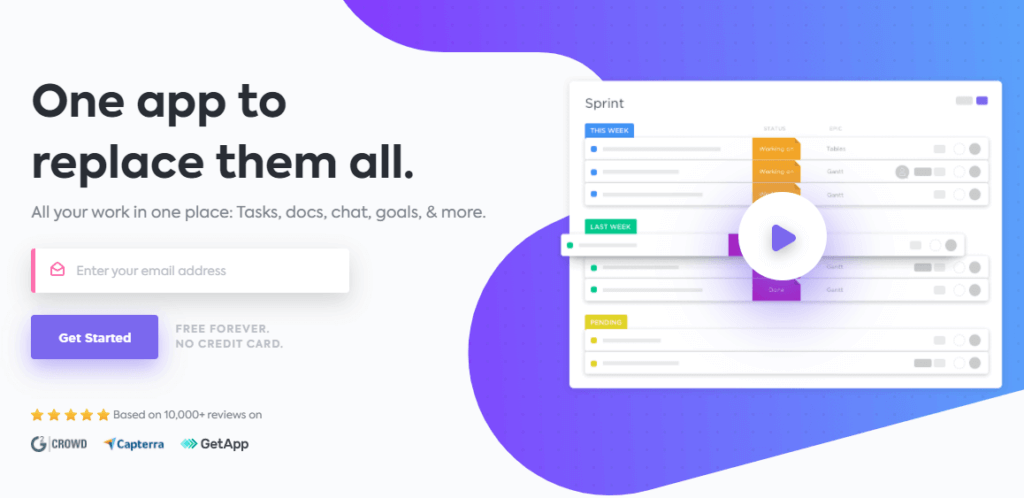
On our own use, the interface is easy to understand and switching between parts of it does not cause confusion. Getting professional tools and features for nothing is the reason we recommend trying it. Our review of Amelia, the WordPress booking plugin covers a narrower tool with a similar argument behind it, and our blog has the rest of the reviews.
If you want to talk about any of this, contact us.
Frequently asked questions
What is ClickUp?
ClickUp is a cloud-based work productivity platform for teams of any size and type. It combines project management tools, calendars and events and centralised company information into a single dashboard every team member can see.
Who uses ClickUp?
The use cases the platform lists run from development, marketing and project management to education, design, finance, healthcare, law and accounting, alongside personal and student use. The breadth is the point: it is sold as one place rather than a tool for one department.
What is ClickUp good at?
The interface is simple enough to understand and still capable when you need it, and the integrations save the time that usually goes into moving between apps. Being able to see a project from several perspectives is what reduces confusion when tracking tasks.
Is ClickUp really free?
Yes, and unusually so: unlike free versions that ship only basic features, ClickUp offers a full-featured free tier, and it keeps adding features and improvements in response to what customers ask for. That is also why businesses choose it on cost, since it replaces several paid apps at once.
What are the drawbacks?
Having so many features in one platform can overwhelm a new user, and it is not always obvious whether to use a tool for one purpose or another. Some users say they never get the most out of it because there are too many customisation options to choose between, and the design could improve on empty panes, text sizes and colour contrast.
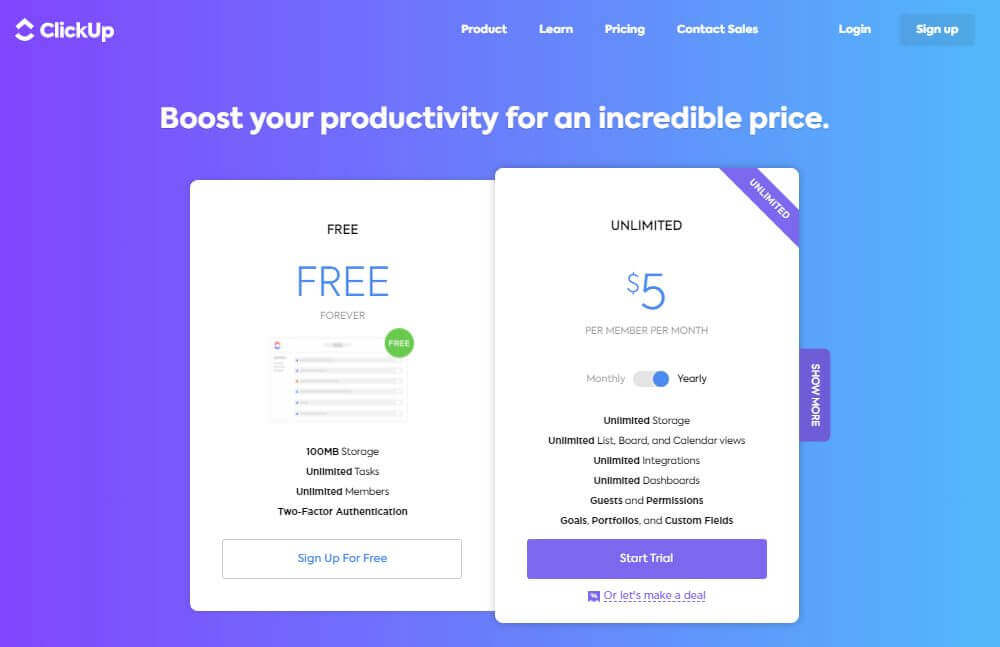
What did ClickUp cost?
On the pricing page this article captured in August 2021, the Free Forever plan included 100MB of storage with unlimited tasks, unlimited members and two-factor authentication, and the Unlimited plan was $5 per member per month with unlimited storage, views, integrations and dashboards. Those are 2021 prices, read from the screenshot published here and not rechecked.