





















In this WP Rocket review, Global Wizards shows the benefits of using the best WordPress cache plugin. Keep reading to see how to take your website to the stars in a few simple steps.
What a caching plugin actually does
Recently on Global Wizards’ blog we talked about WordPress plugins and add-ons and how they help you create unique content. This time it is about caching, which is one of the first things to consider whenever anyone optimises a website.
A cache stores copies of frequently accessed website files on a visitor’s computer or mobile device, so pages they return to do not take long to load. Caching creates static versions of your content and serves those back; a static page renders quickly in a browser, so your content appears faster whenever someone visits.
A caching plugin strips the heavier scripts away and replaces them with a lighter HTML page, which speeds up loads by not running every visit through the server.
The consequence is a better user experience and a better conversion rate, both of them results of a shorter page load time. Your business also performs better in search rankings, because search engines favour fast-loading sites.
This article carries a further reason: that over 50% of consumers abandon sites taking more than three seconds to load. That figure is quoted here without a named source, so read it as indicative rather than measured — the argument for caching does not depend on it.

- Page caching stores a static version instead of rebuilding the page for every visit
- Compression reduces the amount of page data transferred
- Preloading prepares cached content before the next request arrives
- Browser caching lets a returning visitor reuse static resources stored locally
- Delivery integrations connect the cache layer with the rest of the site's operating stack
WP Rocket, and what it adds
WP Rocket is a WordPress caching plugin that improves a site’s performance by increasing its loading speed. In our own use it compared well with the other options available at the time on support, updates, performance and ease of use.

Put simply, the plugin saves pages of your site that have already been loaded and serves them faster when a visitor comes back.
It acts on the browser cache, storing static resources of the site temporarily, and on the site cache, creating static HTML pages that avoid PHP processing. It also does more than cache: HTML minification and delayed loading of JavaScript are among the options.
What WP Rocket turns on by itself
As soon as you activate WP Rocket, six features are already on: page caching, GZIP compression, cache preloading, eCommerce optimization, browser caching and compatibility. That is the starting point for a WordPress site before anyone opens a settings screen.

You can also customise the settings. File Optimization minifies and combines the CSS and JS files of your site, optimises CSS delivery and loads JavaScript deferred.
The options also let you tweak how images and iframes are displayed. With Lazy Load, media files load only when needed, saving a visitor’s bandwidth, and WP Rocket preloads your content automatically, or manually if you prefer.
There is an extensive set of options for optimising your database and keeping it tidy, which speeds up the site and makes the data run more efficiently.
For an international audience a CDN is the key to faster loading. If you already use one, the WP Rocket dashboard integrates it in seconds; if you do not, RocketCDN is a custom-made service for reducing latency and improving availability.
Three add-ons extend the plugin further: Varnish Cache, Cloudflare integration and Sucuri integration.
Is WP Rocket worth it?
The platform is easy to use, and you do not need to be an expert to set it up. The vendor’s own claim on the page above is that its activated options apply 80% of web performance best practices; this article restated that as at least 80% of your web performance being improved automatically, which is a stronger claim than the source it came from, so treat the vendor’s wording as the reliable one.
Support is the other thing worth naming: the team was consistently responsive to our questions about the plugin.
Bloggers, freelancers, agencies and anyone running an eCommerce site can use a cache plugin to good effect. For a blogger, SEO-friendly content works better with fast load times. For freelancers and agencies building WordPress sites, speed and conversion matter as much as design, and this takes care of that side. For an eCommerce owner, the dedicated optimisations are the reason to look.
What WP Rocket cost in 2021
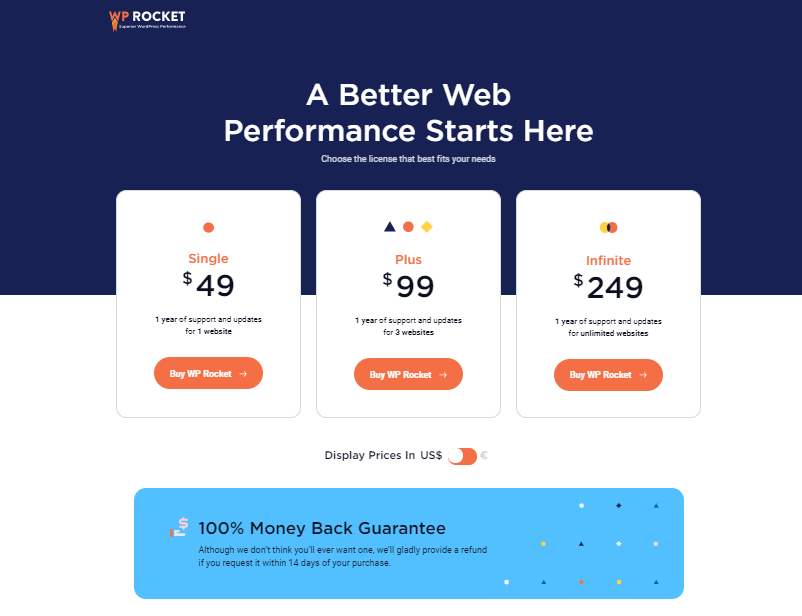
WP Rocket was sold as an annual licence, and the tiers differed by the number of websites covered rather than by feature. There was no free version.
Global Wizards’ thoughts about WP Rocket
Caching is a straightforward way to improve performance and give visitors a better experience, and a cache plugin is worth installing on any WordPress site you care about the speed of.
WP Rocket does not offer a free version, and on our own use it was still worth the licence, because it removed the need to install several other plugins. That is our assessment rather than an independent benchmark. Our review of Kinsta hosting covers the other half of the same problem, which is what the server does before the plugin ever runs.
Our team is committed to giving you the information to make better decisions. Visit our blog to read more about tools and news from the digital marketing world. You can also drop us a line to know more about our services.
Frequently asked questions
What is a caching plugin?
A caching plugin stores copies of frequently accessed website files on a visitor’s computer or phone, so pages they return to do not have to be rebuilt from scratch. On WordPress it also strips heavier scripts and serves a lighter HTML page instead, which is what stops every visit running through the server.
How does caching speed up a WordPress site?
Caching creates static versions of your content and serves those back to visitors. A static page renders quickly in a browser, so the content appears faster on a repeat visit, and the reduced page load time is what improves user experience, conversion rate and search ranking, because search engines favour fast-loading sites.
What is WP Rocket?
WP Rocket is a WordPress caching plugin that improves a site’s loading speed. It acts on the browser cache, by storing static resources temporarily, and on the site cache, by creating static HTML pages that avoid PHP processing. It also goes beyond caching, with HTML minification and delayed loading of JavaScript among its options.
Which WP Rocket features are on by default?
Six are active as soon as the plugin is activated: page caching, GZIP compression, cache preloading, eCommerce optimization, browser caching and compatibility. Everything else is available to customise, but those six are what you get without opening a settings screen.
What add-ons does WP Rocket offer?
Three, as described here in September 2021: Varnish Cache, Cloudflare integration and Sucuri integration. Separately, the dashboard integrates an existing CDN in seconds, and RocketCDN is offered for anyone who does not already have one.
Did WP Rocket have a free version in 2021?
No. As this review described the product in September 2021, WP Rocket had no free version; it was sold as annual licences differing by the number of websites covered, with a money-back guarantee inside a stated window. Prices and terms change, so check the vendor rather than relying on a 2021 description.