





















WPDataTables builds responsive tables and charts on WordPress, and its six addons are where the plugin stops being a table generator and starts being a data tool. This is what each one does, what separates an addon from a plugin, and what five of them cost in August 2021.
What WPDataTables does
WPDataTables was built to create responsive tables and charts on WordPress. In three steps you can add content to a custom table, which is a straightforward way to give readers something to engage with rather than a wall of figures.
The plugin was designed to make data presentation easier, faster and more efficient, and it ships with a long feature list before any addon is involved — advanced features, table data editing, column types and the rest.
What an addon is, and what it is not
An addon is an extension of a particular program. It extends that program’s functionality and works only with it, which is what lets it assume so much about the thing it is extending.
A plugin is a third-party extension built for software in general rather than for one specific product. The distinction matters when you are working out what will still work after an update.
The six addons, and what each adds
With over 60 features, WPDataTables is described as the most complete WordPress tables plugin there is — and because there is always someone who wants more, the addons extend it further. There are six: five paid, one free.

- Forminator integration turns submitted form data into tables
- Master-detail views connect a summary row to a more detailed record
- Powerful Filters adds more advanced ways to narrow a table
- Gravity Forms integration turns that plugin's submissions into tables
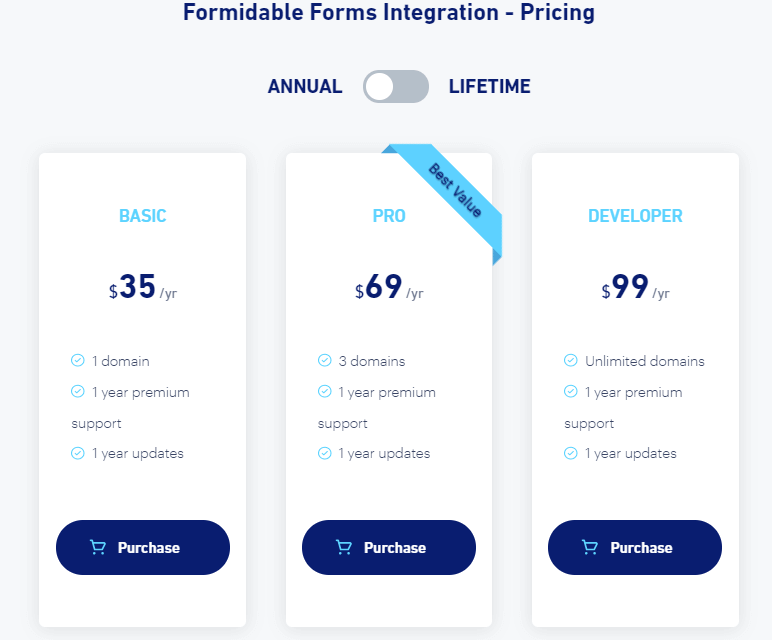
- Formidable Forms integration turns that plugin's submissions into tables
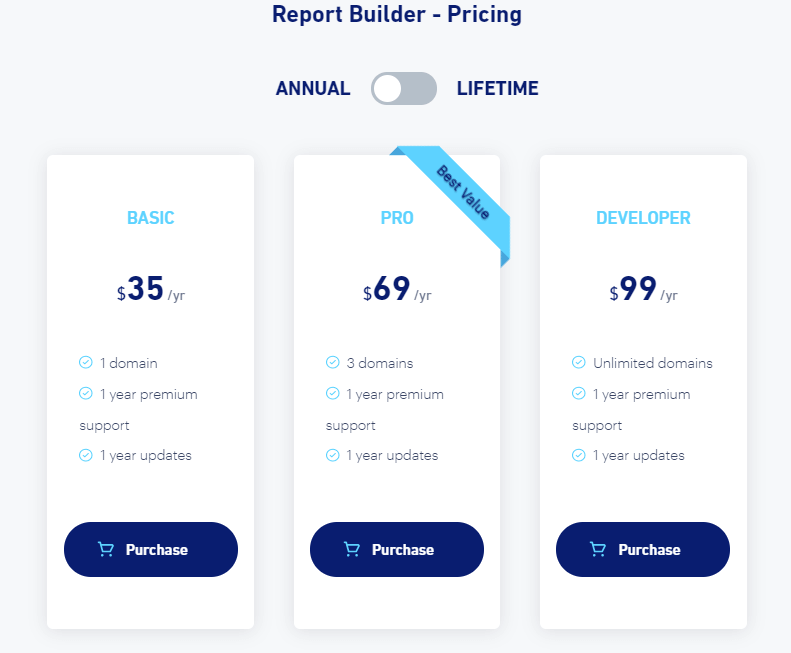
- Report Builder turns table data into downloadable reports
Forminator forms, the free one
This free addon connects WPDataTables to Forminator, an easy-to-use form builder. It lets you add a form as a new table, so you can analyse Forminator’s form data and display it through WPDataTables rather than exporting it somewhere else.

Master-detail tables
This addon lets you show hidden columns to visitors with a single click, so the table stays tidy and the detail is still available for any row a reader wants to open. Add and hide as many columns as you like.
Powerful filters
Powerful Filters lets users filter table data with cascade filters, and hide the table entirely until a filter has been applied. Cascading is the useful part: each filter narrows the options available in the next one, so a visitor gets to a short list without reading the long one.
Gravity Forms
This addon lets you build wpDataTables from your Gravity Forms entries. Install Gravity Forms, activate the integration, and a Gravity Form table type appears as an option in WPDataTables.
Formidable Forms
The same idea for a different builder: create tables from your Formidable Forms entries. Once installed and activated, you can create a table in WPDataTables linked to Formidable Forms as an existing data source.
Report Builder
Filling in the same document repeatedly stops being a job with Report Builder: prepare templates and let the addon generate the documents.
What this is worth
Addons add functionality to a site without asking anything of you that a plugin does not. The good thing about WordPress plugins and addons in general is that no prior coding knowledge is required — they exist to make the work shorter.
We think addons are central to getting the most out of a WordPress site, and once you start using them it is hard to go back. Our review of premium WooCommerce themes covers the same trade-off on the design side, and our blog has more on the plugin ecosystem.
If you want a hand setting any of this up, contact us for a 30-minute consultation.
Frequently asked questions
What is WPDataTables?
WPDataTables is a WordPress plugin for building responsive tables and charts, and it takes three steps to add content to a custom table. It exists to make data presentation easier, faster and more efficient than laying a table out by hand.
What is the difference between an addon and a plugin?
An addon extends one specific program and works only with that program, which is why it can assume so much about what it is extending. A plugin is a third-party extension built for software in general rather than for one product.
How many WPDataTables addons are there?
Six. Five are paid and one, the Forminator forms integration, is free to download. Together they extend what is described here as the most complete WordPress tables plugin, with over 60 features before any addon is installed.
What do the form integrations do?
The free Forminator addon connects WPDataTables to the Forminator form builder, so a form becomes a new table you can analyse and display. The Gravity Forms and Formidable Forms addons do the same for those two builders, letting you build a table from existing form entries.
What do master-detail tables and powerful filters add?
Master-detail lets a visitor open hidden columns with one click, so a table stays readable and the detail is still there for anyone who wants a row expanded. Powerful Filters adds cascade filtering, where each filter narrows the options in the next, and can hide the table until a filter is applied.
What did the paid addons cost?
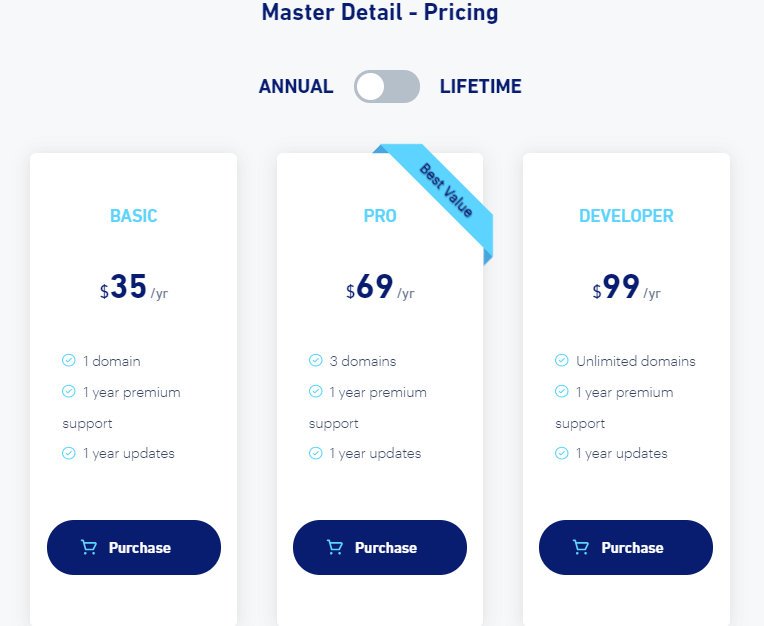
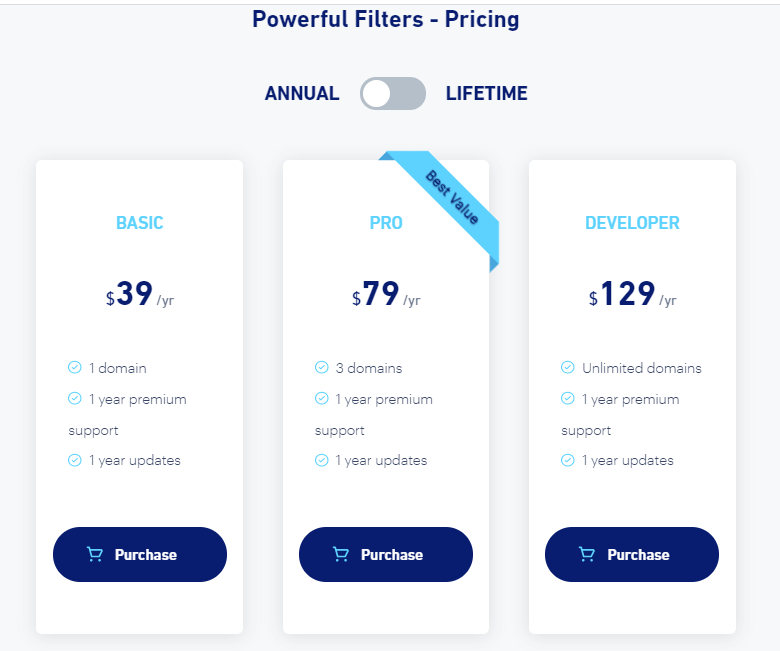
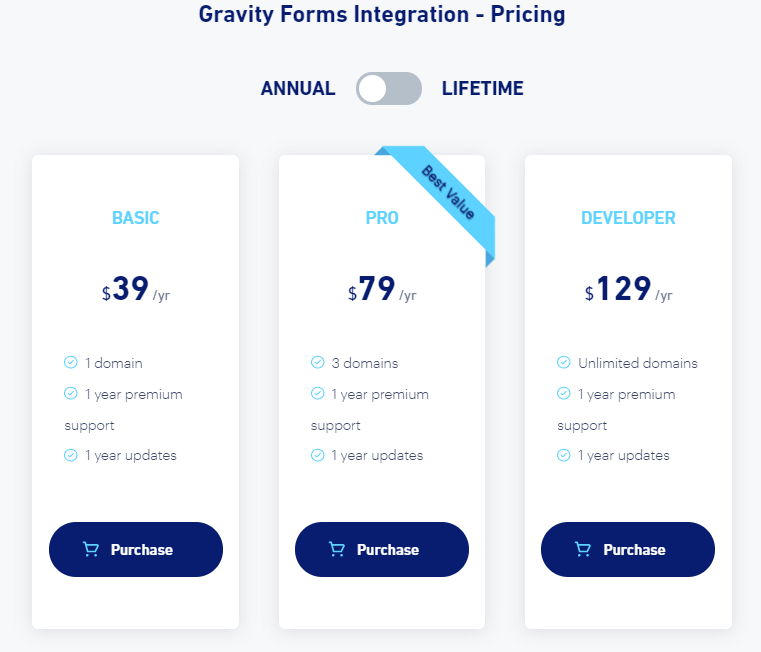
On the annual pricing pages this article captured in August 2021, Master Detail, Formidable Forms and Report Builder were each $35 a year for one domain, $69 for three and $99 for unlimited, while Powerful Filters and the Gravity Forms integration were $39, $79 and $129 across the same three tiers, all including a year of premium support and updates. Those are 2021 prices, read from the screenshots published here and not rechecked.